General Description
Default Menu Location Reports >> Item Control >> Min-Max Report
Screen Name MINMAXREPT
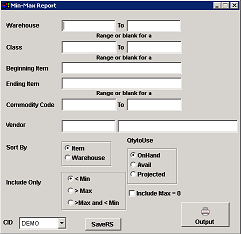 Min-Max Report |
FunctionMin-Max report screens allows users to see on-hand quantity, the location of merchandise stored.
Fields/Filters
Warehouse: Warehouse location or Warehouse codes
Class: Merchandise class
Beginning Item: Beginning item for the report
Ending Item: Ending item for the report
Commodity Code: The Commodity code
Vendor: Vendor name or code
Sort By: Preference to choose for the report
Include Only: Preference to choose for the report
Qty to Use: Preference to choose for the report
FAQ
Q: Why is an item not showing on this report.
A: This report ignores items with a MIN order quantity of zero.
