General Description
Default Menu Location: Transaction >> Importers/Exporters >> Item Control >> Inventory Qty Import
Screen Name: IMPORTQTYIMP
Function: Add or replace stock inventory quantities.
Average Cost will be updated according to the value in the spreadsheet. Inventory Cost Tiers are not updated; they must be added using the Cost Tier Import.
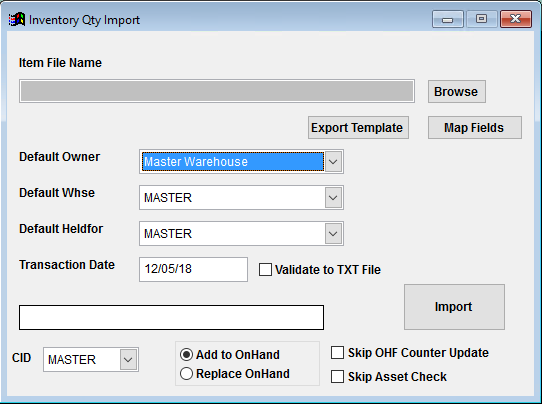 Inventory Quantity Import Screen |
Filters/Fields
Item File Name/Browse: Use the Browse button to locate and select the completed Inventory Quantity import template file (in XLS format).
Export Template: Generates a blank Inventory Quantity import template file
Map Fields: Fields must be mapped prior to importing. If no changes have been made to the column headings, the mapping screen should show all green, and you can click OK to continue. If any of the Input Field Name columns on the left are red, single-click on the line on the left column, and then double-click the desired mapped field in the right column to complete the mapping. Repeat for any red lines on the left that should be mapped. If there are additional columns in the source file that should NOT be mapped, they can be left unmapped (displayed in red). Mandatory fields will require that they be mapped before clicking OK.
Default Owner: Sets the inventory owner for all imported quantity records. This list is populated with Organization records that have the Inventory Owner attribute.
Default Warehouse: Sets the warehouse location for all imported quantity records. This list is populated by Warehouse Control records that have been created.
Default HeldFor: Sets the inventory holder for all imported quantity records. This list is populated from the Item Held For Codes (HOLDER) Rule Maintenance record. If a catch-all code such as 'DEF' is used, make sure the HOLDER rule is set up properly.
Transaction Date: Sets the transaction date for the QTYIMP transaction.
Validate to TXT File: Selecting this box will create a TXT errors file listing any rows that would create errors such as invalid data, or duplicate records. If no errors are found in the file, the import will still process and no error file will be generated. Checking the validate box only prevents the import process if errors are encountered.
Add to OnHand: The default option is to add the imported quantities to any existing on hand quantity.
Replace OnHand: Select the replace option if the quantity values in the import file represent the total on hand quantity for each item and they should replace the current on hand quantity.
Skip OHF Counter Update:Skip Asset Check:Inventory Quantity Import File Definitions
Required fields are indicated with an *
f1 - Lot - Lot number for lot controlled inventory. Do not use the Inventory Quantity import for coil items. Follow the
Coil Import Guide for details on importing coil quantities.
f2 - PrintLabel - Enter a 'Y' to indicate that a label should be printed
f3 - LabelNo - Enter the number of labels that should be printed
f4 - OwnerID - Inventory Owner organization ID. If left blank, the import request screen can fill in the Owner for ALL imported records.
f5 - HeldFor - Inventory Holder name from the HOLDER rule, which must also match a valid organization ID. If left blank, the import request screen can fill in the Held For for ALL imported records.
f6 - Serial - Serial ID for serialized inventory items
*f7 - AvgCost - Average cost per stocking unit, as of the transaction date for the associated quantity
*f8 - Qty - On Hand quantity (in stocking unit) for the associated item
f9 - ID1 - If the item is a 'Track Length' item, enter the ID1 value here. You can learn more about the 'Track Length' feature
here.
f10 - ID2 - If the item is a 'Track Length' item, enter the ID2 value here.
f11 - Whse - Inventory Warehouse location name. If left blank, the import request screen can fill in the Warehouse For for ALL imported records.
*f12 - Item - Item number
f13 - Bin - Item bin location. If the Bin does not exist in the Bin Control screen, the import program will add the needed Bin record.