General Description
Default Menu Location Maintain >> Address Book >> Organization Screen
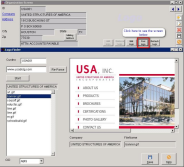 Organization- Logo Finder Screen |
Logo Finder is a "jump screen" from the
Organization screen.
- It searches for logos and pictures from the organization website the user is working on
- It displays a list of pictures, logos, and icons on the left side of the Logo Finder screen
- Type in the Organization ID and hit Enter
- Then click on Find Logo button for the "Jump Screen"