General Information
Default Menu Location Maintain >> Shipping >> Carton Status
Screen Name CARTSTATE
Function The Carton Details screen provides history and content information about a specific carton.
To display carton information, type the Carton ID (no 'C' in the number) and press Enter.
The
Details tab displays general info regarding the location, SE#, dimensions, weight, etc.
The
Contents tab shows what is in the carton. You can double-click on any carton in the grid to drill down further.
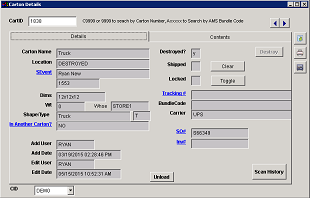 Carton Details Details Tab |
 Carton Details Contents Tab |